
Purpose

This document provides pre-requisites and SOPs for installing Cavisson Agents (Machine Agent, Log Agent, Application Agents).
Prerequisites
- Need to run by the root user.
- Storage requirement – 1 GB.
Installation Steps
- Download the CavissonAgent Installer using the below command.
wget https://nde.cav-test.com/HUB/CavissonAgentInstaller.<version>.bin –no-check-certificate
Note: Replace version with the version number of agent installer. Connect with your Cavisson representative for getting the latest build.
- Store the file on your
- Execute the installer file using root
Syntax
bash
CavissonAgentInstaller.<version>.bin –basedir=“<base_directory>” –user=“<user_name>” –cavisson-server=“<CavissonServerHost>:<Port>” –tier=“<tiername>” –gateway-server=“<proxyHost>:<proxyPort>” –verbose=“true” –machine-agent –java-agent –nodejs-agent –php-agent –python-agent –log-agent –gateway
Note: To enable both the Machine Agent and Log Agent with the Application Agent, use the following additional parameters:
Machine Agent: –machine-agent
Log Agent: –log-agent
Example
Only Machine Agent:
sudo bash CavissonAgentInstaller.4.14.0.106.bin –basedir=“/opt” –user=“cavisson”
–cavisson-server=“cloudpoc4.cav-test.com:443” –tier=“NOCJava” –verbose=“true” –machine-agent
For Java Agent:
sudo bash CavissonAgentInstaller.4.14.0.106.bin –basedir=“/opt” –user=“cavisson”
–cavisson-server=“cloudpoc4.cav-test.com:443” –tier=“NOCJava” –verbose=“true” –machine-agent –java-agent
For NodeJS Agent:
sudo bash CavissonAgentInstaller.4.14.0.106.bin –basedir=“/opt” –user=“cavisson”
–cavisson-server=“cloudpoc4.cav-test.com:443” –tier=“NOCNode” –verbose=“true” –machine-agent –nodejs-agent
For PHP Agent:
sudo bash CavissonAgentInstaller.4.14.0.106.bin –basedir=“/opt” –user=“cavisson”
–cavisson-server=“cloudpoc4.cav-test.com:443” –tier=“NOCPHP” –gateway-server=“127.0.0.1:1111” –verbose=“true” –machine-agent –php-agent –gateway
For Python Agent:
sudo bash CavissonAgentInstaller.4.14.0.106.bin –basedir=“/opt” –user=“cavisson”
–cavisson-server=“cloudpoc4.cav-test.com:443” –tier=“NOCPython” –gateway-server=“127.0.0.1:1111” –verbose=“true” –machine-agent –python-agent –gateway
Note
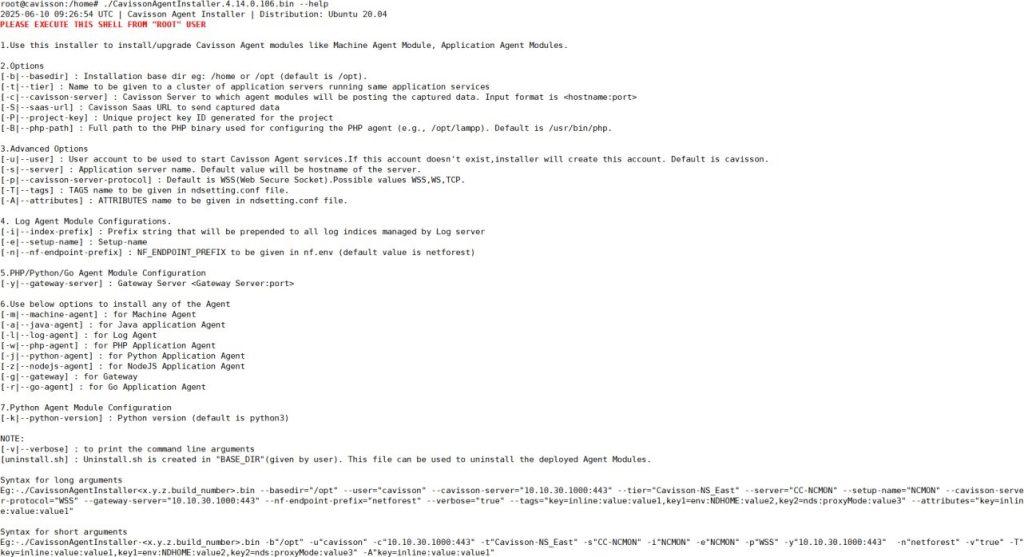
To know more about the installer and various parameters, run the following command:
./CavissonAgentInstaller.4.14.0.106.bin –help
Verification of Installation
Once you execute the installer, you can see the messages that show that agents are successfully installed.

Directory Structure
Following directory structure should be created after Agent Installation.
For Machine Agent: $Base_DIR/cavisson/monitors
For Java Agent: $Base_DIR/cavisson/netdiagnostics/java
For NodeJs Agent: $Base_DIR/cavisson/netdiagnostics/nodejs For PHP Agent: $Base_DIR/cavisson/netdiagnostics/php
For Python Agent: $Base_DIR/cavisson/netdiagnostics/python For Proxy: $Base_DIR/cavisson/netdiagnostics/proxy
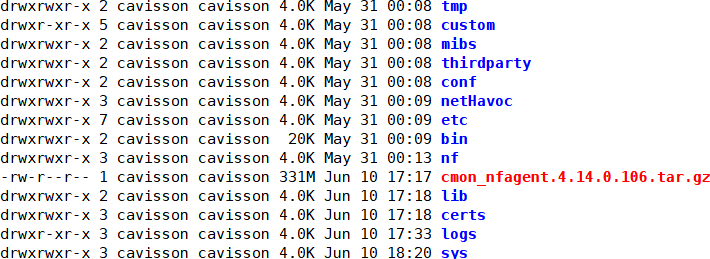
Files to check for Machine Agent
Check for the files present at the below mentioned paths.
Path – $Base_DIR/cavisson/monitors
Files to check for Java Agent
Check for lib directory files present at the below mentioned paths.
Path – $Base_DIR/cavisson/netdiagnostics/java

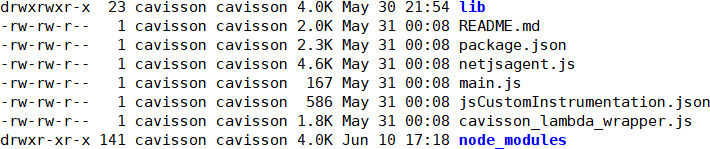
Files to check for NodeJS Agent
Check for the files present at the below mentioned paths.
Path – $Base_DIR/cavisson/netdiagnostics/nodejs/src/netjsagent
Files to check for PHP Agent
Check the PHP Agent .so file and Proxy Control file are present at the below mentioned paths.
PHP Agent .so File
Path – $Base_DIR/cavisson/netdiagnostics/php
File- cavPHP<version>Agent.<release>.<version>.so
File- cavisson.ini
Example:
In Ubuntu: /opt/cavisson/netdiagnostics/php. File- cavPHP8.2Agent.4.14.0.106_Ubuntu20.so
In CentOS/RHEL: /opt/cavisson/netdiagnostics/php. File- cavPHP8.0Agent.4.14.0.106_Red.so
Proxy Control File
Path: $Base_DIR/cavisson/netdiagnostics/proxy/ “CavNDProxy.<release>.<version>”
Example:
In Ubuntu: /opt/cavisson/netdiagnostics/proxy. File- CavNDProxy.4.14.0.106_Ubuntu20
In CentOS/RHEL: /opt/cavisson/netdiagnostics/proxy. File- CavNDProxy.4.14.0.106_Oracle
Linking of PHP
In Ubuntu20:
/etc/php/<PHP_Version>/<webserver>/conf.d/cavisson.ini -> /opt/cavisson/netdiagnostics/php/cavisson.ini
Example:
/etc/php/7.4/apache2/conf.d/cavisson.ini -> /opt/cavisson/netdiagnostics/php/cavisson.ini
In RHEL/CentOS
/etc/php.d/cavisson.ini -> /opt/cavisson/netdiagnostics/php/cavisson.ini
Files to check for Python Agent
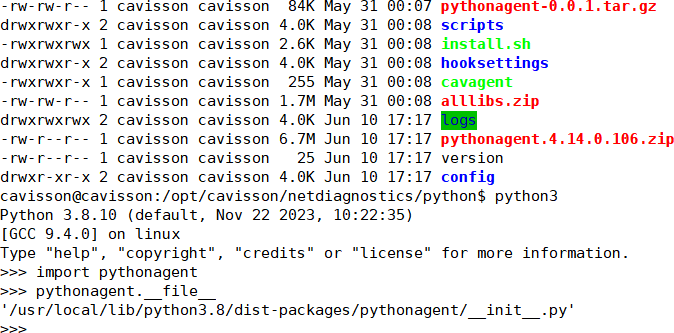
Check for the files present at the below mentioned paths. Path – $Base_DIR/cavisson/netdiagnostics/python
Configuring Application Agents
Java Agent
To enable Java Agent in any Java based server, add below command to the startup shell/Env setup file.
Apache Tomcat Server
CATALINA_OPTS=“$CATALINA_OPTS –
javaagent:$ND_HOME/java/lib/ndmain.jar=time,ndAgentJar=$ND_HOME/java/lib/n dagent-with-dep.jar,ndHome=$ND_HOME“
export CATALINA_OPTS
JBoss Application Server
JAVA_OPTS=“$JAVA_OPTS –
javaagent:$ND_HOME/java/lib/ndmain.jar=time,ndAgentJar=$ND_HOME/java/lib/nd agent-with-dep.jar,ndHome=$ND_HOME“
JAVA_OPTS=“$JAVA_OPTS -Djboss.modules.system.pkgs=com.cavisson.ndutils”
Path: /opt/jboss/wildfly/bin File: standalone.conf
Where, ND_HOME=$Base_DIR/cavisson/netdiagnostics
Note: For other Java Application Servers, Configure javaagent in the respective configuration file.
NodeJS Agent
To enable NodeJS Agent, Add the following line in the application’s entry point file (i.e., where the application starts).
var netjsagent = require(‘netjsagent’).instrument({ logLevel: ‘debug’, BCILoggingMode: ‘FILE’ });
OR
To start the application with the NodeJS Agent without changing the application code, use the following command:
node –require netjsagent/main.js app.js
Note: If application already have a –require statement, then add additional –require statement with netjsagent/main.js
Python Agent
To start the application with the Python agent, use the following command:
cavagent run python3 app.py
PHP Agent
No configuration required in PHP Agent.
Log Agent
To enable Log Agent, Add the following keywords in the cmon.env file.
CAV_MON_AGENT_OPTS=”-F 1″ OUTPUT_HOST1=<NF_HOST> OUTPUT_PORT1=<PORT> CAV_LOG_STORAGE_AUTO_DISCOVERY=false CAV_LOG_STORAGE_ENV=env CONFIG_PROTOCOL=https
NF_ENDPOINT_PREFIX=/netforest Path: /opt/cavisson/monitors/sys/ File: cmon.env
Uninstallation Steps
- In $Base_DIR/cavisson, sh file should be present after completion of installation.
- To uninstall, just run ./uninstall.sh
- It clears all the files and processes, which are initiated and created by the